Quality Profiles
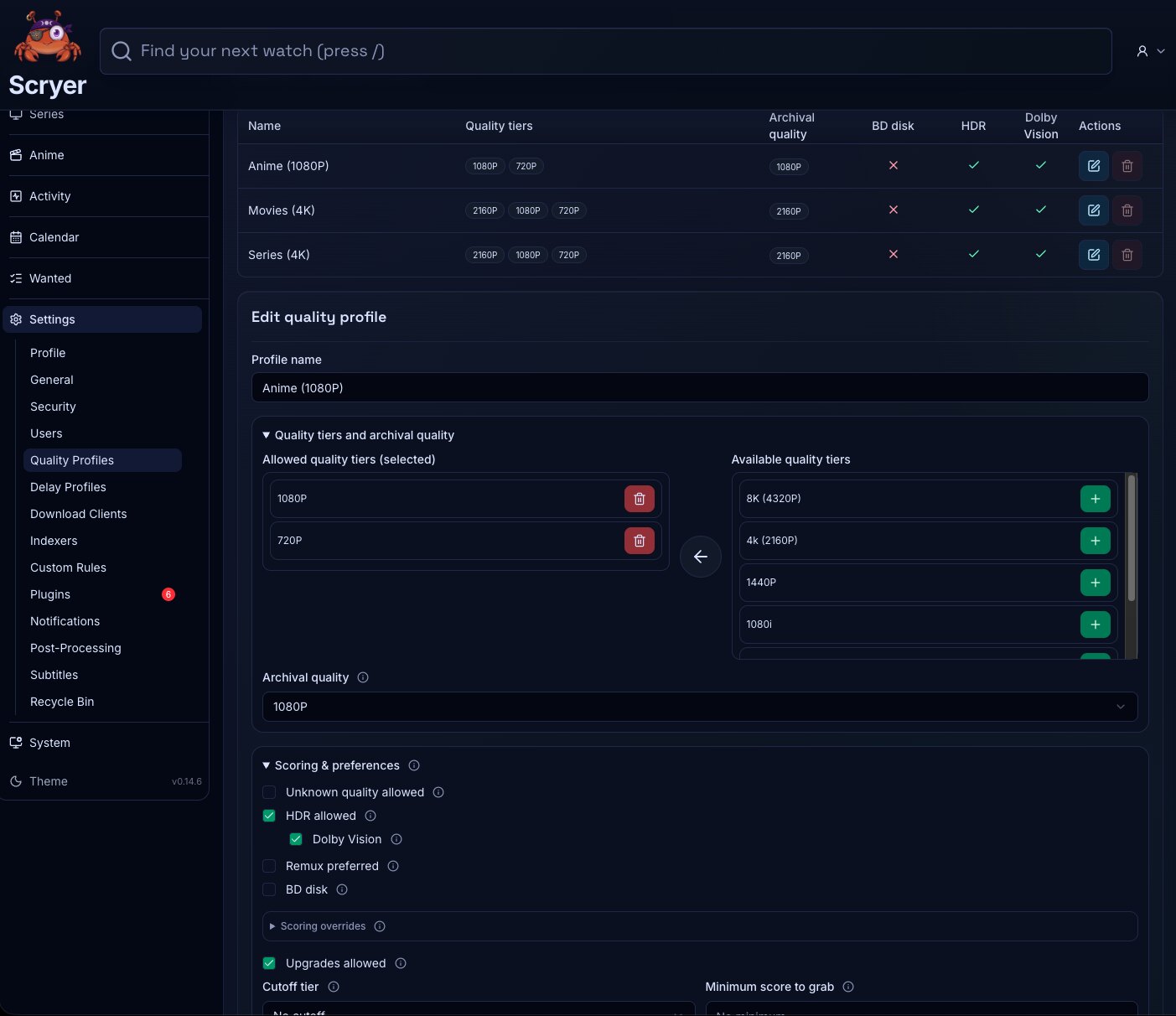
Quality Profiles are where you spell out the quality you’re aiming for — the preferences and cutoffs that titles and facets can reference.
- To access: Settings → Quality Profiles
- To view: Requires
manageCatalogSettingsapp permission
Working In Quality Profiles
Section titled “Working In Quality Profiles”If you’re adding a library for the first time, create quality profiles here before assigning them in Movies, Series, or Anime Settings — facets can’t reference a profile that doesn’t exist yet.
If titles keep appearing in Cutoff Unmet unexpectedly, open the assigned profile here and confirm the cutoff target reflects your current intent before changing title-level settings.
Here you create, edit, and remove quality profiles, set quality ordering and cutoff targets, and review which profiles are safe to use as defaults. Name profiles descriptively enough that you can tell which one is intended for which library policy.
Create a profile before assigning it to Movies, Series, or Anime defaults. After changing a cutoff, review Cutoff Unmet — and after changing any shared profile, re-check one representative title to see the effect before wider follow-up.
Choosing A Scoring Persona
Section titled “Choosing A Scoring Persona”A persona is a preset that sets roughly fifty scoring weights at once. It decides how much a Blu-ray beats a WEB-DL, what each audio codec and channel layout is worth, how Dolby Vision and HDR are treated, whether remuxes get a bonus, how file size is rewarded or punished, what a well-regarded release group counts for, and how editions, streaming sources, and anime tags are scored. You pick one and adjust from there.
One thing personas do not control is the quality tier itself. The order of qualities in your profile is always the dominant factor — first tier scores far above second, and a quality missing from the profile is rejected outright. Personas mostly decide between releases of the same quality.
| Persona | Pick it when |
|---|---|
| Balanced | You want good releases without a strong opinion. The default, and the right answer for most libraries. |
| Audiophile | Audio matters most. Heavily rewards TrueHD Atmos, DTS-X, and lossless tracks, strongly prefers remuxes, and tolerates large files. |
| Efficient | Storage or bandwidth is the constraint. This is the only persona that penalizes very large files and rewards smaller encodes, and the only one that favors x265. |
| Compatible | Playback reliability matters more than maximum quality — older TVs, streaming boxes, or clients that struggle with exotic formats. Prefers WEB-DL, favors widely-supported audio, and is the only persona that penalizes Dolby Vision. |
Switching persona re-scores future decisions immediately. It does not re-evaluate files you already have — those move only when something better appears and clears your upgrade settings.
Where To Set It
Section titled “Where To Set It”Persona is set in settings, not on a profile. You can set it at three levels, and the most specific one wins:
- Per library — overrides everything else for that library
- Per category — separate personas for Movies, Series, and Anime
- Global — the fallback when neither of the above is set
If you set none, Scryer uses Balanced. The setup wizard also asks for a persona per category on first run.
A saved quality profile does not carry a persona. If you upgraded from a version that stored one, that value was migrated out into the settings above and the profile was reset. Setting a persona expecting the profile to remember it won’t work — use the levels listed above.
Scoring Overrides
Section titled “Scoring Overrides”Overrides are stored on the quality profile, under Scoring overrides in the profile editor. Each one is Yes, No, or Default, where Default means “whatever this persona already does.”
- Prefer lossless audio — raises TrueHD, DTS-X, DTS-HD MA, and FLAC to Audiophile levels without adopting the rest of that persona. On by default only for Audiophile.
- Prefer compact encodes — swaps in Efficient’s size curve, rewarding smaller files. On by default only for Efficient.
- Block upscaled — rejects releases flagged as AI-upscaled. On by default in every persona; setting it to No disables the block.
- Block Dolby Vision without fallback — rejects DV releases with no HDR10 fallback layer, which can otherwise play with washed-out color on non-DV hardware. Off by default everywhere, so this is opt-in.
- Allow x265 at non-4K — intended to stop penalizing x265 below 4K.
Two behaviors worth knowing. Turning an override off doesn’t return you to your persona’s value — it returns you to Balanced’s. That matters most on Efficient: setting “prefer compact encodes” to No replaces Efficient’s size curve with Balanced’s, which is the opposite of what the wording suggests.
And a codec allowlist outranks the persona entirely. If a profile allowlists video or audio codecs, persona codec weights stop applying and score comes from allowlist order instead. Source allowlists don’t work this way — they only filter, and survivors keep their persona weight.
For what the personas actually do numerically, and how they combine with TRaSH Guides data, see TRaSH Guides And Scoring Personas.
Related Concepts
Section titled “Related Concepts”- TRaSH Guides And Scoring Personas — the weight tables behind each persona and how release-group tiers are scored
- Cutoff Unmet — titles with files that fall below the cutoff configured in a quality profile
- Movie Quality Settings — assigns quality profiles to the Movie facet
- Series Quality Settings — assigns quality profiles to the Series facet
- Anime Quality Settings — assigns quality profiles to the Anime facet