Wanted
Wanted is where missing items surface — monitored items that Scryer expects in a library but doesn’t currently see there.
- To access: Wanted → Wanted
- To view: Requires
viewlibrary permission; entries shown reflect the libraries your account can access
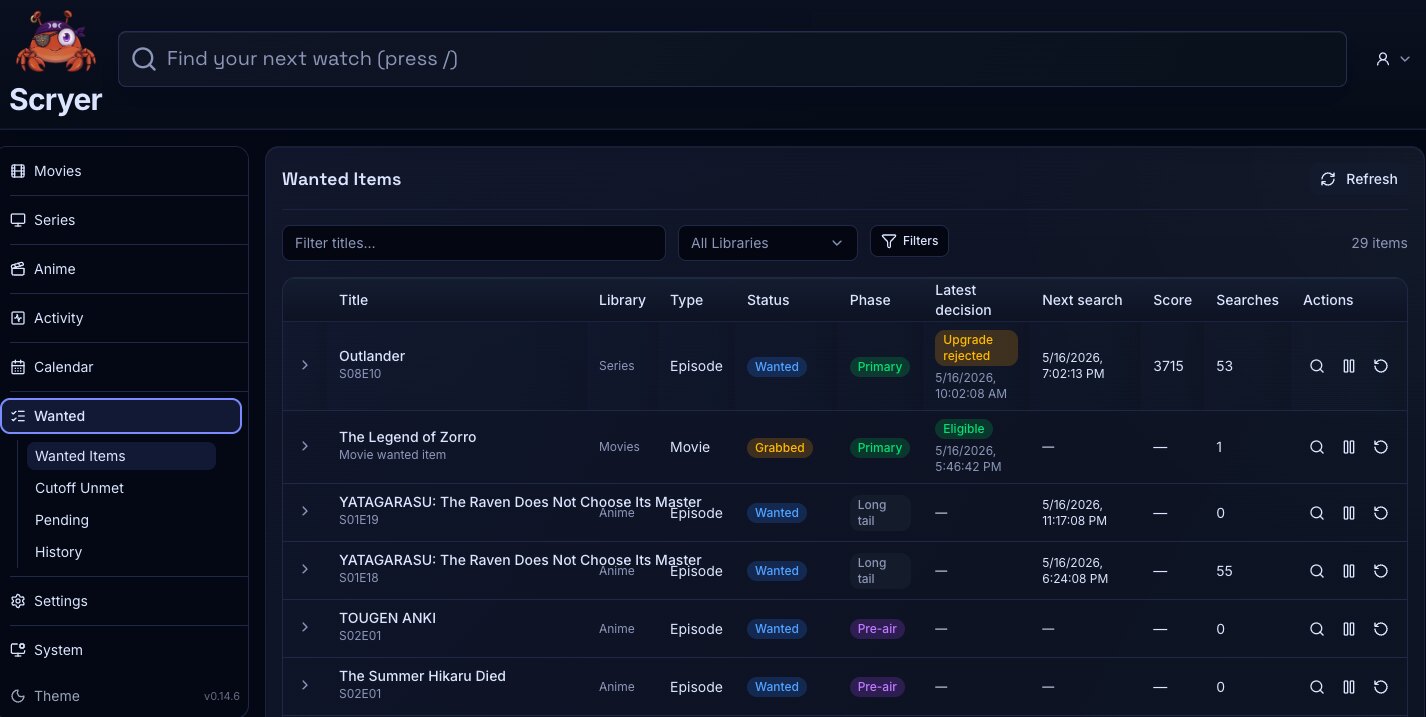
(Click to Zoom Image)
Open Original
Working In Wanted
Section titled “Working In Wanted”If a title is missing from your library, find it here and confirm it’s still monitored and that the assigned library root path is correct before looking elsewhere.
If a file exists on disk but Scryer doesn’t see it, open the title here to check monitoring state, then review the root path in the facet’s Library Settings if everything else looks right.
- Filter wanted rows by facet, title, or status where available.
- Open the related title overview.
- Trigger supported title-level follow-up actions where your permissions allow it.
- Open a missing item and confirm the title is still monitored.
- Check the library root when a file exists locally but Scryer does not see it.
- Review routing and profile settings before taking title-level action.
- Move to Activity or Import if the missing state looks operational rather than policy-related.
Related Concepts
Section titled “Related Concepts”- Cutoff Unmet — titles with files that are present but fall below the configured quality cutoff
- Pending — releases Scryer has matched and is holding under a delay profile before acting
- Library Layout — path layout that determines where Scryer looks for files when evaluating missing state
- Activity — live feed showing import and provider events relevant to titles appearing in this list