Rules
Rules are reusable policy you define once and assign where needed; Scryer can apply them during routing and selection decisions.
- To access: Settings → Rules
- To view: Requires
manageCatalogSettingsapp permission
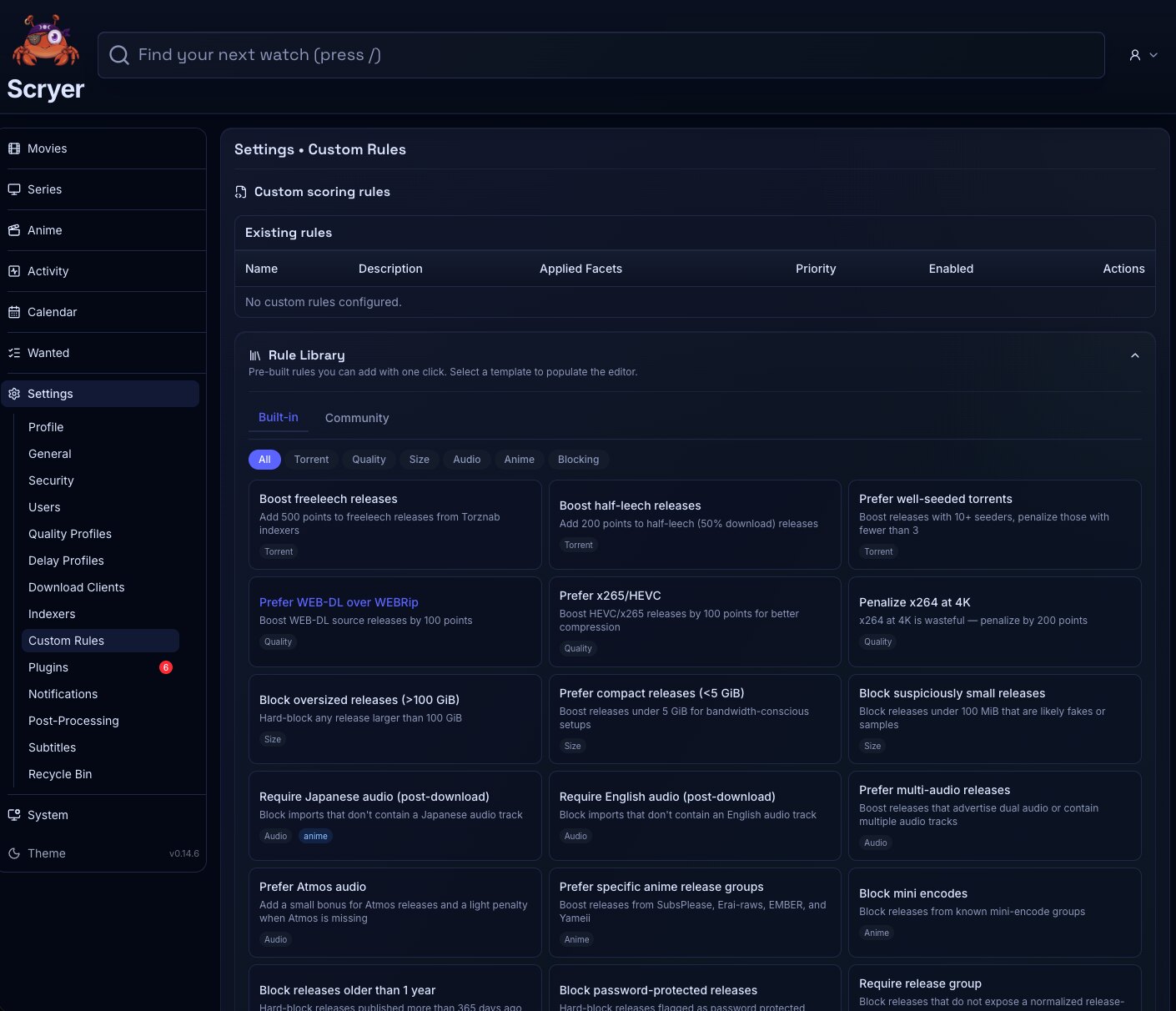
Working In Rules
Section titled “Working In Rules”If you want to route certain releases differently — by quality, size, or source — create the rule here first, then assign it in the relevant facet’s Routing settings. Rules that aren’t assigned to a facet have no effect.
If routing is behaving unexpectedly for a facet, check which rules are currently assigned to it before editing the rule definition here.
Here you create, edit, disable, and remove rules, and review which facets or provider instances reference each one. Keep rule names clear enough to still make sense later, and prefer a small set of well-named rules over many near-duplicate variants.
Create a rule before assigning it in Movies, Series, or Anime Routing. Disable a rule temporarily while checking a provider configuration issue, and review a rule’s references before deleting it.
Related Concepts
Section titled “Related Concepts”- Movie Routing Settings — where rule sets are assigned to Movie library operations
- Series Routing Settings — where rule sets are assigned to Series library operations
- Anime Routing Settings — where rule sets are assigned to Anime library operations
- Delay Profiles — timing policies that rules can reference when shaping release handling